Development of a Mobile Learning Application for Kindergarten: Process, Issues, and Challenges
Darwin Paul C. Tuliao¹, Thaniel Jay G. Duldulao², Wilben Christie R. Pagtaconan³, Annjeannette Alain D. Galang⁴
¹Graphic Designer, Price Waterhouse Coopers Service Delivery Center Manila Ltd, Philippines, [email protected]²Associate Solutions Architect, Jump Digital, Philippines, [email protected]
³Assistant Professor II and Chairman, Department of Computer Science, Mariano Marcos State University, Philippines, [email protected]
⁴Assistant Professor I, Mariano Marcos State University, Philippines, [email protected]
Abstract
Mobile learning is now considered as a branch of ICT in education. Because it makes use of technology that is more affordable and more easily self-procured and managed than tethered computers, mobile learning requires reconceptualizing traditional models of technology use and implementation. This study aimed to develop a mobile learning application that provides new learning pedagogy and integrate ICT in the learning process of Kindergarteners. This study focused on the development of a mobile learning application for Kindergarten named iSuro. The contents of the application were based from the existing learning modules of kindergarten in mother tongue (Iloco). The application is implemented in android- based mobile devices. It provides a digital content of information, a user-friendly environment to kindergarteners that enables them to be more productive and engaged in classroom activities, and a one-size-fits-all learning. The system should be adopted by schools in the Province of Ilocos Norte for the Kindergarteners to have an additional material for learning as well as more fun and exciting learning experiences. Since the dialect used in the contents of the application is Iloco, a language selection feature should be incorporated so that other Regions could also use the application.
Keywords: Mobile Learning, Kindergarten, iSuro, Android Application
Introduction
Mobile devices such as mobile phones and tablet computers are now being used by an increasing number of learners and educators as tools in accessing information. These mobile devices are also being used to restructure administration and to facilitate learning in new and innovative ways.
Mobile technologies are continuously evolving. At present, there is a wide variety of mobile devices on the market like mobile phones, tablet computers, e-readers, portable audio players, and hand-held gaming consoles. Mobile devices are digital, portable, and are usually owned and controlled by an individual rather than an institution. These devices can also access the internet, have multimedia capabilities, and can facilitate a large number of tasks, particularly those related to communication. Mobile technologies have opened up a new learning pedagogy and have introduced an innovative platform.
Mobile learning involves the use of mobile technology and can be integrated with other information and communication technology (ICT) resources to facilitate learning anytime and anywhere. Learning can unfold in a variety of ways. People can use mobile devices to access educational resources, connect with others, or create content, both inside and outside classrooms. Mobile learning includes efforts to support broad educational goals such as effective administration of school systems and improved communication between schools and families.
Mobile learning is now considered as a branch of ICT in education. Because it makes use of technology that is more affordable and more easily self-procured and managed than tethered computers, mobile learning requires reconceptualizing traditional models of technology use and implementation. While computer and e-learning projects have historically been constrained by a hardware that is expensive, fragile, heavy, and kept in tightly controlled settings, mobile learning projects tend to assume that students have uninterrupted and largely unregulated access to technology.
Today, mobile technologies are common even in areas where schools, books, and computers are scarce. As the price of mobile phone ownership continues to decline, more and more people, including those in the remote areas, are likely to own and know how to use a mobile device. With this, mobile technologies provide an excellent medium for extending educational opportunities to learners who may not have access to high-quality schooling. Utilizing the relative affordability of mobile devices do not replace but rather complement existing educational investments such as textbooks, infrastructure, hardware, training, and content.
Moreover, as the amount and type of information these mobile devices can collect and provide to their users increase, mobile technology can soon personalize learning. For example, for a student who is a visual learner with an interest in maps, historical information could be presented in an interactive atlas which can be manipulated on a touch-screen device. Meanwhile, students with different learning preferences could be presented with similar information in a very different way, such as a timeline indicating important events with links to informational videos and primary- source documents. Over time, personal technology will supersede one-size-fits-all models of education.
In the Philippines, the K to 12 Program covers Kindergarten and 12 years of basic education (six years of primary education, four years of Junior High School, and two years of Senior High School) to provide sufficient time for mastery of concepts and skills, to develop lifelong learners, and to prepare graduates for tertiary education, middle-level skills development, employment, and entrepreneurship. These domains are the developmental tasks or milestones that kindergarteners are expected to attain. These include: (1) Physical Health, Well-being, and Motor Development, (2) Social-Emotional Development, (3) Character and Values Development, (4) Cognitive/ Intellectual Development, (5) Language Development, and (6) Creative and Aesthetic Development.
In the enhanced Kindergarten curriculum, students learn the alphabet, numbers, shapes, and colors through games, songs, and dances, in their mother tongue. Examples, activities, songs, poems, stories, and illustrations are based on local culture, history, and reality. This makes the lessons relevant to the learners and easy to understand (K to 12 Curriculum Guide – Kindergarten, 2012).
With the implementation of the Kindergarten curriculum, teachers experience difficulty in providing each student with individual attention and in engaging Kindergarteners to perform their activities in class. Kindergarteners, on the other hand, experience difficulty in carrying textbooks and notebooks, making them weary of going to school. Also, education is only confined to the four walls of a classroom using the traditional chalk and board teaching approach.
This study aimed to develop a mobile learning application for Kindergarten that will provide new learning pedagogy and integrate ICT in the learning process of Kindergarteners. The Cognitive/ Intellectual Development domain was considered. This domain refers to a child’s ability to abstract, to understand concepts and their logical relations, and to manipulate them to arrive at new ideas or conclusions. In this domain, Mathematics was used as subject. At the same time, this study was conducted to provide solution to the difficulties encountered by Kindergarten and Kindergarten teachers.
Objectives of the Study
The general objective of the study is to determine and analyze the process of developing a mobile learning application for Kindergarten.
Specifically, this study is intended to:
- Identify the Kindergarten teachers’ teaching strategies and the challenges they face when it comes to implementing Kindergarten curriculum in terms of:
- Policy
- Materials
- Teaching Methods
- Determine the development tools and platform for the mobile learning application.
- Design and develop the mobile learning application appropriate for the Kindergarten curriculum.
- Determine the users’ acceptability in terms of the mobile learning application’s:
- Functionality
- Usability
- Performance
Review of Related Studies
Theoretical Framework
Mobile technologies, both hardware and networking applications, are necessary components for the existence of mobile learning. As instructors and designers, practitioners of mobile learning need to be fluent in the use of these technologies and be cognizant of what technologies their learner population has access to. Application of specific pedagogical theories is directly connected to the technologies in use in a mobile learning system; as such, design of mobile learning environments demands a systems approach where development accounts for all aspects of the environment. As technology continues to improve and innovate, the options open to mobile learning will expand. The key is to focus on the fact that the goal of mobile learning is to facilitate learning, no matter what form the delivery may take (Caudill, 2007).
Mobile technologies are recognized pieces of our lives and are necessary attachments to our bodies. Educators need to understand and consider the advantages of mobile technologies to education and expand their use.
According to Herrington et al (2009), design principles are being expressed in active terms that enable their ready use by teachers and designers similar context and problems. It may refer to the characteristics of a planned learning design on what it should look like, or its procedure on how it should be.
The following are the characteristics of mobile learning applications, as recommended by Herrington et al (2009): 1) Real world relevance – use mobile learning in authentic contexts; 2) Mobile contexts - use mobile learning in contexts where learners are mobile; 3) Explore - provide time for exploration of mobile technologies; 4) Blended - blend mobile and non-mobile technologies; 5) Whenever - use mobile learning spontaneously; 6) Wherever - use mobile learning in non-traditional learning spaces; 7) Whomsoever - use mobile learning both individually and collaboratively; 8) Affordances - exploit the affordances of mobile technologies; 9) Personalize - employ the learners’ own mobile devices; 10) Mediation - use mobile learning to mediate knowledge construction; and 11) Produse - use mobile learning to produce and consume knowledge.
Conceptual Framework
The Input-Process-Output (IPO) model was used in describing the conceptual framework of the study. As shown in Figure 1, the input consists of the needed data requirements in this study. Among the inputs are: 1) Kindergarten curriculum; 2) Kindergarten teachers’ teaching strategies and challenges in terms of policy, materials, and teaching methods; and 3) development tools and platform for the mobile learning application.
Figure 1
Conceptual Framework
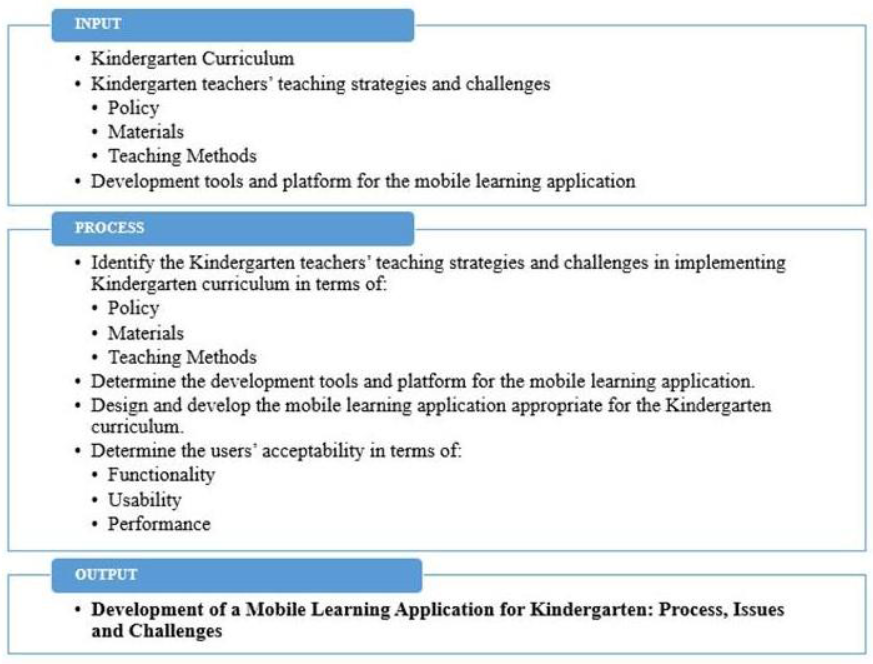
The processes included are as follows: 1) identify the Kindergarten teachers’ teaching strategies and challenges in implementing Kindergarten curriculum in terms of policy, materials, and teaching methods; 2) determine the development tools and platform for the mobile learning application; 3) design and develop the mobile learning application appropriate for the Kindergarten curriculum; and 4) determine the users’ acceptability in terms of functionality, usability, and performance.
Methodology
This section presents the research methods used in this study. The study was conducted at Banna Central Elementary School (BCES) in Banna, Ilocos Norte, Philippines. BCES was chosen to be the pilot school of this study since it is currently the adopted school of the Department of Computer Science for the Project F1 – an extension activity of the department.
To identify the Kindergarten teachers’ teaching strategies and challenges in implementing Kindergarten curriculum in terms of policy, materials, and teaching methods, the researchers conducted interviews to two (2) Kindergarten teachers.
The development tools and platform for the mobile learning application were determined thru Internet and library research.
On the other hand, the Mobile-D Development Methodology by Kynkäänniemi and Komulainen (2006) in Figure 2 was utilized in the design and development of the mobile learning application. This development methodology is an agile development approach for mobile devices with five (5) phases, namely: Explore, Initialize, Productionize, Stabilize, and System Test and Fix. Explore. The initial plan of the developed application was formulated based from the inputs. Initialize. The researchers prepared the architectural design, use case diagrams, User Interface (UI), and their different functionalities. Productionize. The researchers implemented the planned activities based on the prepared design. The researchers used the identified mobile development tools and platform in constructing the application and implementing the functionalities of the application. Stabilize. In this phase, the researchers finalized the documentation of the application. System Test and Fix. In this phase, the researchers did testing and debugging of the application. After that, they released a functional mobile application named iSuro.
Figure 2
Mobile-D Development Methodology

To determine the users’ acceptability in terms of functionality, usability, and performance, User Acceptance Testing (UAT) was conducted. Twenty (20) parents and twenty-five (25) Kindergarteners were considered as respondents. The respondents were given time to use the application and were asked to evaluate the application using the UAT rubric. Table 1 was used to interpret the data
Table 1
Scale to measure the users’ acceptability
| Weighted Mean Range | Interpretation |
|---|---|
| 4.20-5.00 | Strongly Agree (SA) |
| 3.40-4.19 | Agree (A) |
| 2.60-3.39 | Moderately Agree (MA) |
| 1.80-2.59 | Disagree (D) |
| 1.00-1.79 | Strongly Disagree (SD) |
Results and Discussions
Based on the interviews conducted, the following are the difficulties encountered by the kindergarten teachers and kindergarteners in the current process of teaching and learning. Teachers having large class sizes have difficulty in providing each child with individual attention. Teachers also have difficulty in encouraging pupils to participate and perform their activities in class. Kindergarteners, on the other hand, have difficulty in carrying textbooks and notebooks which makes them weary of going to school. Also, there are problems in the Department of Education (DepEd) in relation to the scarcity of learning materials or textbooks.
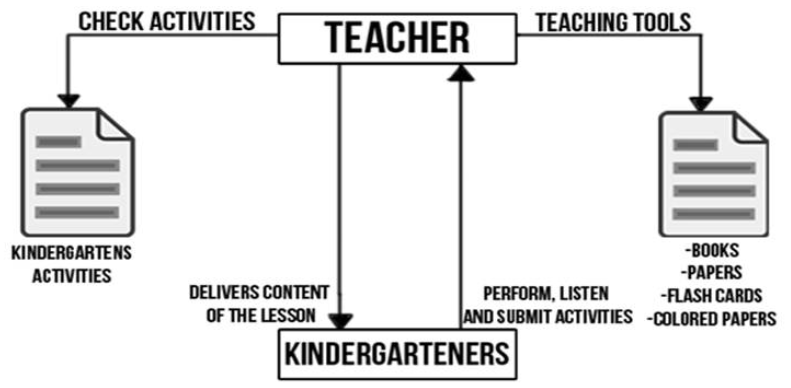
The context flow diagram of the existing teaching strategies is shown in Figure 3. The figure shows the current method or workflow practiced in the teaching and learning process of the Kindergarten curriculum. Teachers use books, flash cards, and colored papers as teaching tools. The teachers also check activities manually to know the scores of every pupil. In delivering the content of the lesson, the teacher discusses the lessons to the whole class and asks pupils for feedbacks. After or during the lesson, pupils are expected to participate, listen, and submit their activities in class.
Figure 3
Context Flow Diagram
In parallel to the curriculum, the topics were selected and the lessons were derived from the module “Umuna A Panagbaniaga Kadagiti Numero”.
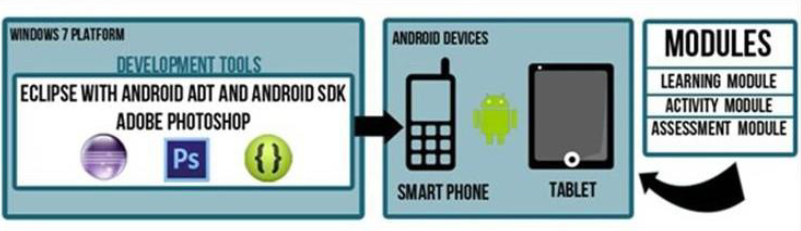
The development architectural design in Figure 4 indicates the technologies and tools used for the development of the application. The application was developed in a Windows 7 operating system. Eclipse 4.2 (Juno) was used as a tool in building the system, from setting the user interface, implementing images and videos, to implementing the source codes. After developing the system, the iSuro application was deployed to an android device. SQlite served as the database of the application.
Figure 4
Development Architectural Design of the Application
The users can manage all the lessons, activities, assessments, options and demonstrations, as shown in Figure 5.
Figure 5
Use Case Diagram
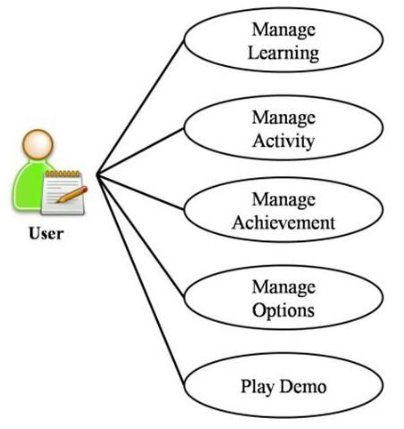
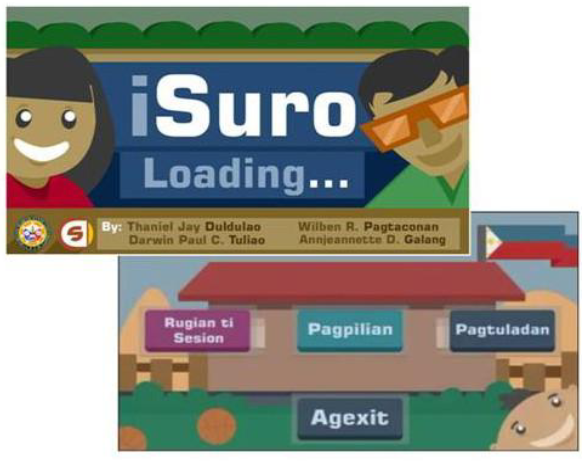
Figure 6 presents the main menu of the application with buttons: “Rugian ti Sesion” (Start Session), “Pagpilian” (Options), and “Pagtuladan” (Play Demo).
Figure 6
Main Menu of the iSuro
The application includes three (3) main modules:
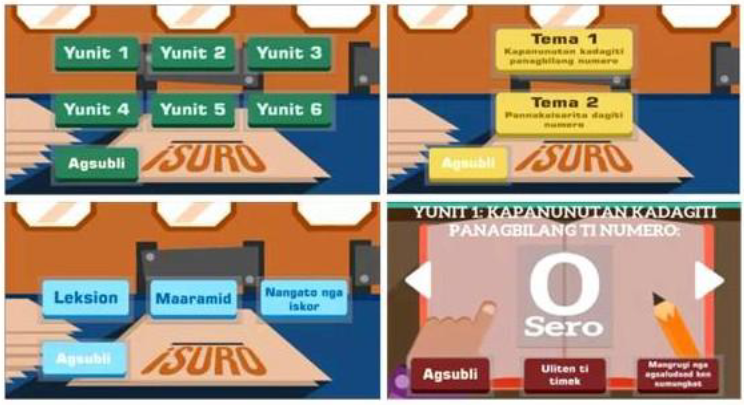
Learning Module: This module enables the user to read and understand the lessons. The application provides a digital flipbook and a voice over. The user can choose lessons from different units. Figure 7 presents the Learning Module of the iSuro application.
Figure 7
Learning Module
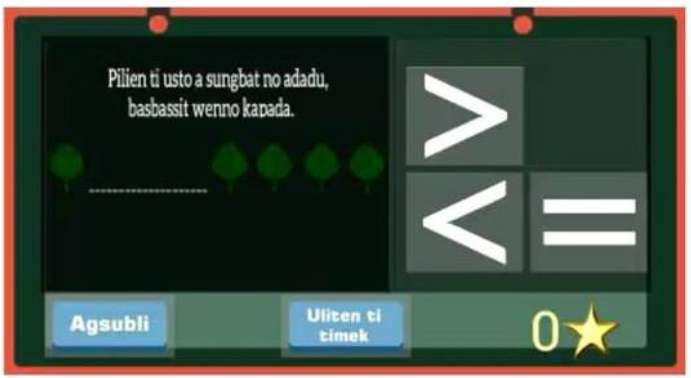
Activity Module: This module enables the user to answer the questions that pop out. After reading and understanding the lessons, the application provides a question and answer to evaluate the user’s skill. Figure 8 presents the Activity Module of the iSuro application.
Figure 8
Activity Module
Assessment Module: This module enables the user to view the rewards. After answering the activities in the activity module, the application reveals the correct answer. The answers are saved and checked against the database before the score or reward is shown to the user. The application allows the user to save his name in the score board. Figure 9 presents the Assessment Module of the iSuro application.
Figure 9
Assessment Module
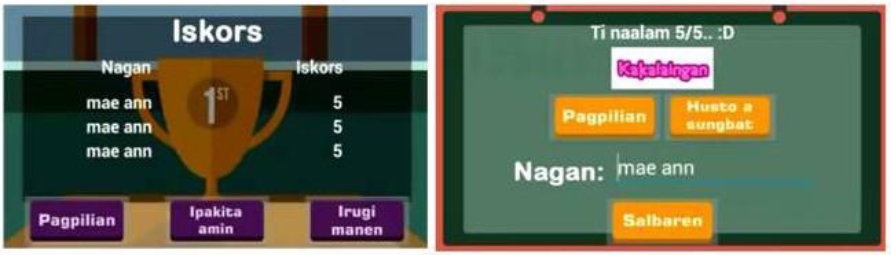
Table 2 shows the result of the user acceptance test taken by the kindergarten teachers. Based on the survey conducted, the system garnered an overall mean of 4.54 which means that the teachers strongly agree on the functionality, usability, and performance design of the system.
It is interesting to note that the respondents appreciated the application. “The teaching and learning process is more permanent using this device and the lessons are well organized”- Teacher Respondent.
Table 2
User Acceptance Test (Teacher)
| Categories | Mean | Description |
|---|---|---|
| 1. Functionality | 4.98 | Strongly Agree |
| 2. Usability | 4.26 | Strongly Agree |
| 3. Performance | 4.37 | Strongly Agree |
| Overall Mean | 4.54 | Strongly Agree |
Table 3 shows the result of the user acceptance test taken by the Kindergarteners. The overall mean is 4.37 which signifies that Kindergarteners strongly agree on the functionality, usability, and performance design of the system.
Table 3
User Acceptance Test (Kindergarteners)
| Categories | Mean | Description |
|---|---|---|
| 1. Functionality | 4.23 | Strongly Agree |
| 2. Usability | 4.18 | Agree |
| 3. Performance | 4.69 | Strongly Agree |
| Overall Mean | 4.37 | Strongly Agree |
Table 4 shows that the researchers also conducted a user acceptance test to the parents of the Kindergarteners. The respondents tried the system and they feel good about it. The respondents marked the application 4.43 which implies that the parents strongly agree on the functionality, usability, and performance design of the system.
Table 4
User Acceptance Test (Parents)
| Categories | Mean | Description |
|---|---|---|
| 1. Functionality | 4.75 | Strongly Agree |
| 2. Usability | 4.38 | Strongly Agree |
| 3. Performance | 4.15 | Agree |
| Overall Mean | 4.43 | Strongly Agree |
Conclusions and Recommendations
Mobile learning provides the ability to use mobile devices to support teaching and learning. Its mobility makes it stand apart from other types of learning, particularly designing learning experiences that make the most of the opportunities that can offer us. Although some say that physical books count as mobile devices too, mobile devices have distinct features and functionality for supporting learners. Moreover, its convergence with the internet further offers potential opportunities to support teaching and learning.
The iSuro application provides a new tool in teaching and learning in the Kindergarten Curriculum, a digital content of information, a user-friendly environment to kindergarteners that enable them to be more productive and engaged in classroom activities, and a one-size-fits-all learning.
Through careful analysis and design of the system, the researchers recommend that the system be adopted by schools in the province of Ilocos Norte. This is for the Kindergarteners to have an additional material for learning as well as more fun and exciting learning experiences. Also, the researchers further recommend that the system should have more lessons and activities.
In addition, it is recommended that since the dialect used in the contents of the application is Iloco, a language selection feature should be incorporated in iSuro so that other regions could also use the application.
References
Caudill, J. (2007). “The Growth of m-Learning and the Growth of Mobile Computing: Parallel developments”. Management Publications and Other Works. http://trace.tennessee.edu/ utk_manapubs/7
Herrington, A., Herrington, J., and J. Mantei. (2009). Design and Priciples of Mobile Learning. Retrieved on September 5, 2013 from http://ro.uow.edu.au/
K to 12 Curriculum Guide for Kindergarten. (January 2012). Retrieved on August 25, 2013 from http:// www.gov.ph/k-12/.
Spataru, A. (2010). Agile Development Methods for Mobile Applications. Retrieved from http:// citeseerx.ist.psu.edu
Umuna A Panagbaniaga Kadagiti Numero (n.d). Learning Module in Mathematics for Kindergarten (In Iloko).
UNESCO Policy Guide for Mobile Learning. (2013). Retrieved on August 20, 2013 from http://www. scribd.com/doc/135377777/UNESCO-Policy-Guidelines-for-Mobile-Learning
International Journal on Open and Distance e-Learning, Vol. 1 No.1&2, December 2015 Issue