Smart Lecture Video Production: A Case Study with Philosophy and Media Literacy*
Tomotsugu Kondo
Professor, Director of Center for Online Education, The Open University of Japan, Japan, [email protected]Abstract
This paper describes a case study of a method of creating video lectures while reducing cost and improving quality. Since 1985, the Open University of Japan (OUJ) has provided TV and radio broadcast lectures, as well as face-to-face lectures. As an additional lecture style, full online courses were launched in 2016. I was appointed start-up project manager, so I developed the Smart Lecture Video Production method to prepare the online courses. Our mission was to develop six undergraduate courses and two graduate courses within a year. Because hiring a video crew is generally expensive, we decided to try the entire development process ourselves. However, the project faced many problems, such as a limited budget, tight deadlines and lack of staff. To solve these problems, I created the following philosophy: we will achieve this project for all learners, for lecturers and staff. In accordance with this philosophy, we also developed production tools and media literacy instructional materials. As a result, the project mission was accomplished. Currently, the Smart Lecture Video Production method is applied to not only online courses but also some TV broadcasting productions.
Keywords: philosophy, development environment, media literacy, staff development, video shooting technique, non-professional
Introduction
This paper details a practical case study of online course development at the Open University of Japan (OUJ). The OUJ opened two online courses on a trial basis in April 2015 and launched eight full online courses in April 2016. In the full course, students are not required to go to an accredited exam center to take an exam. Instead, they watch video lectures, read documents, submit reports, participate in discussions, etc. This learning method is vastly different than those used at the OUJ for classroom and TV lectures. Therefore, we needed to drastically alter the course development process as well as produce the six undergraduate courses and two graduate courses within a year.
I was appointed start-up project manager to prepare the full online courses in March 2015. The development team consisted of eight members in total: three full-time administrative staff and three part-time technical staff including a project manager and a general manager. However, the project faced many problems, such as a limited budget, tight deadlines and lack of staff. Because hiring a video crew is generally expensive, we decided to attempt the entire development process ourselves.
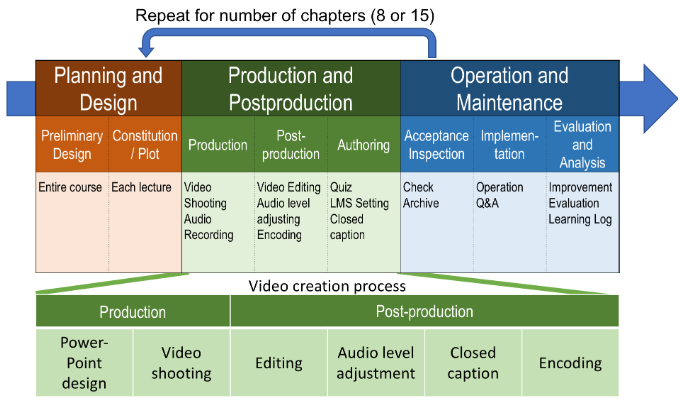
Figure 1 shows the online course production process. It can be divided into three stages: “Planning and Design,” “Production and Postproduction” and “Operation and Maintenance”. The steps from “Constitution / Plot” to “Acceptance Inspection” are repeated for each lecture in the series. I think this process is virtually universal.
The development stages included the following: instructional design, video shooting, narration recording, slide design, editing, encoding, authoring, closed caption, copyright license application and proofreading. Because our technical staff was made up of non-professionals, on-the-job training was required at each development stage. This paper describes how we, as non-professionals, created the broadcast-quality e-Learning courses.
Figure 1. Online Course Production Process
Problems and Objectives
History of Video Lectures at the OUJ
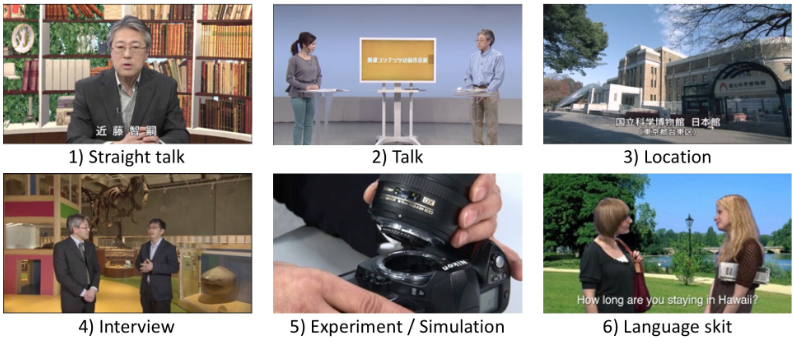
This paper focuses on video lectures, among others, in e-Learning elements. This choice of focus results from the history of the OUJ. The OUJ started testing television broadcasts in 1972, and regular lectures have been aired since 1985. Currently, over 170 TV lecture series is being broadcast. A lecture series consists of 15 45-minute lectures. Video lectures can be classified as 1) Straight talk, 2) Talk, 3) Location, 4) Interview, 5) Experiment / Simulation, and 6) Language skit (Figure 2). They can be divided lectures such as in 1) and 2), and can insert video such as in 3) - 6). Both types can be effectively incorporated in the e-Learning materials. In this paper, these are collectively defined as video lectures. The Japanese name of the OUJ is “Hoso-daigaku,” which means “broadcasting university”. Therefore, for faculty and learners of the OUJ, video lectures are the preferred style.
Figure 2. Classification of Lecture Videos
Problems of Video Production
It is difficult to create video content even for faculty of the OUJ. Not only knowledge of the content, but also video skills such as camera, audio, editing, etc. are necessary to deliver a high-quality production. Normally, to produce video content, we outsource the job to a video production agency. However, the high cost is a major bottleneck.
Objectives
Before beginning the project, I asked myself, “For whom does this project exist?”. Immediate answers were “for the university: to reduce the cost burden” and “for students”. However, I felt this was not enough. Then, I received inspiration, and created our philosophy: we will achieve this project for all learners, for lecturers and staff. This means high-quality content for learners, including people with disabilities, a comfortable studio environment for natural lecturing, and a streamlined skill improvement process for staff. The purpose of this philosophy is to make the objective clear to staff and to help in decision making. In this paper, I describe the production tools and media literacy instructional materials we developed in accordance with this philosophy. This method is titled Smart Lecture Video Production.
Measures
In this chapter, the tasks carried out in this project are presented. As categorized in the above philosophy: for all learners, for lecturers, and for staff.
For All Learners
Closed caption
The act prohibiting discrimination against persons with disabilities was enacted in Japan in April 2016. Because of this, closed captions were added into all video lectures.
1. Development of a Closed Caption Function for Moodle Video Player
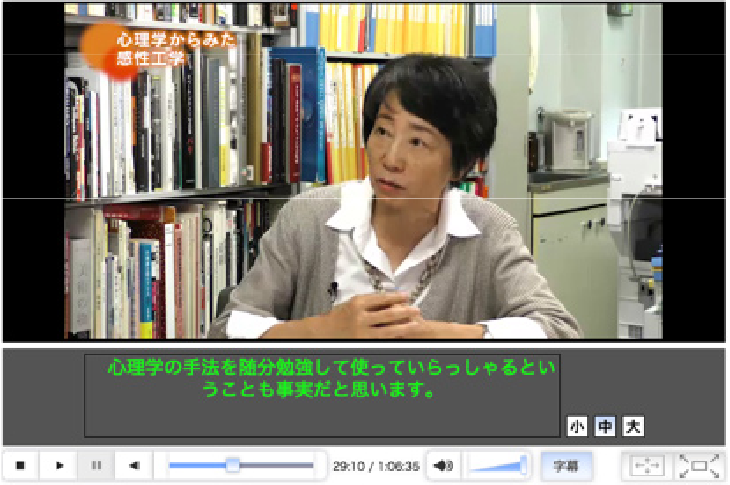
Online courses run on Moodle as an LMS (learning management system), and learners can access them via the Internet using a Web browser. Although video lectures can be embedded on the Web page, closed captions cannot be displayed using the standard Moodle video player. Therefore, we developed a closed caption display function for the video player that we are using (Figure 3). Closed captions are displayed in 23 characters and three lines at the bottom of the video frame. Default character size is 16-point, and it can increase to 20 points or 24 points. Character color can be switched to white, yellow, green or light blue, to differentiate two or more speakers. There are two major formats of closed caption in streaming video on the Web: SubRip and WebVTT. The function can read both formats. Also, not only personal computers but also tablets such as iPad can display closed captions.
Figure 3. Sample of Video Lecture with Closed Caption
2. Closed Caption Preparation Using Automatic Speech Recognition
The OUJ collaborates with Kyoto University to produce closed captions (Kawahara, 2012). Closed captions of online courses are generated using an automatic speech recognition system that was developed by the University. Closed caption data for online courses consists of in-point and out-point time of the video, and speech text. Because the automatic speech recognition system generates the formatted data with both in-point and out-point time, synchronization with the lecturer’s lip movements is easy. However, it is necessary to do manual corrections in the event of a typo. For improving efficiency, I use a closed caption editor that comes with Vimeo. It allows the creation of closed captions in collaboration with a remote staff.
Instructional Designer (IDer)
The unique feature of the OUJ is that the instructional designer (IDer) is selected from the faculty. Furthermore, an online course team must have an IDer from a different field’s faculty for peer review in addition to the lecturing professor. This rule is to ensure easy-to-understand lectures.
Audio Level
After opening the trial online courses in 2015, some inquiries were received from students. Many of the issues related to video production were about audio level. At that time, no criteria existed concerning such issues on the Web. When I became the project manager, I established the criteria compliant with broadcasting. In broadcasting, loudness level is the audio level criteria. The average loudness level should be within -24LKFS ±1dB. Methods for checking the level are the hardware loudness meter and specialized software such as NUGEN Audio LMB (NUGEN Audio Ltd., 2016) and Adobe Audition (Adobe Systems Incorporated, 2016).
For Lecturers
Studios
The OUJ has three TV studios. Figure 4 depicts one of them, and Figure 5 shows its sub-control room. A large staff is necessary to man these studios, as evident from Figure 6. As in a live broadcast, the reason for a large staff is that separate tasks must be done at the same time. The advantage of this method is that the video content is almost complete when the shooting is finished. Unfortunately, in online course production, it is impossible to adopt this method because of a small staff. Instead, the editing is done in the time after the shooting. This method is the same used during a location shooting, such as for a documentary. This method can possibly reduce the burden on the lecturer, although it takes time to complete. With a small staff, it is possible to keep tension at a minimum, and also to discuss fine-tuning (Figure 6). We received some comments from professors, saying they can lecture easier in this environment than in a TV studio. As a sidenote, the studios that are now being used to produce online courses were created from a renovated warehouse (Figure 7).
Prompter Tool
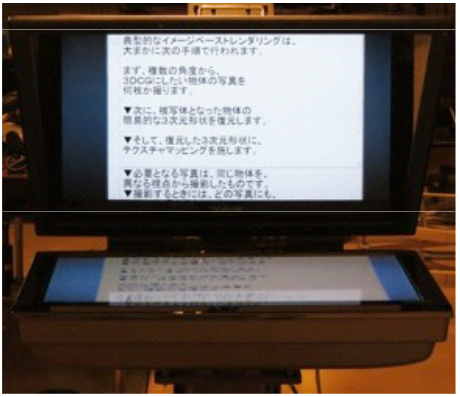
A prompter is a half mirror monitor device (upper left of Figure 8 and Figure 9) that allows lecturers to read material while looking into the camera, like newscasters do. If the lecturer wants to read a printed script placed on the table, a video camera on the ceiling shoots the script and displays it on the prompter. Nowadays, the majority of lecturers use PowerPoint, in which it is difficult to simultaneously change slides and turn the pages of a paper script. Therefore, I developed a tool that enables scripts to be displayed in the PowerPoint note area on the prompter by using PowerPoint macro. The script displayed on the prompter is not only in synchronization with the slide, but the beginning of the next slide script is displayed simultaneously as well. Thus, when switching slides, it is possible to continue speaking fluently. Most of the online courses were shot using this tool. PowerPoint 2010 or later for Windows can run this function.
Figure 4. TV Studio
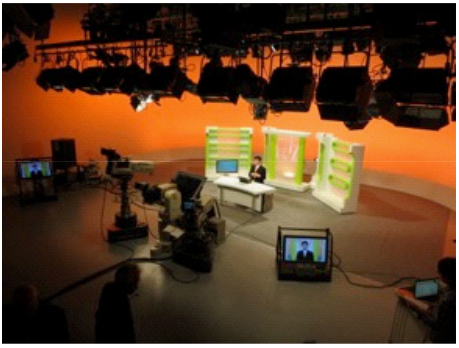
Figure 5. Sub-control Room for TV Studio
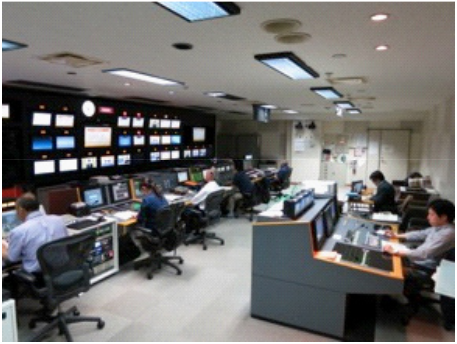
Figure 6. Studio 714
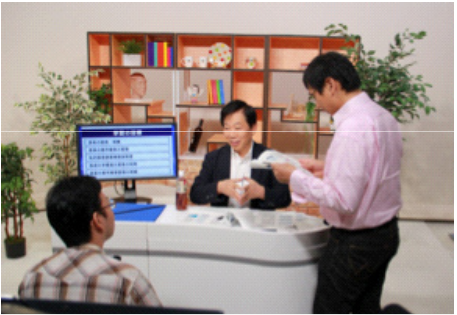
Figure 7. Studio 518
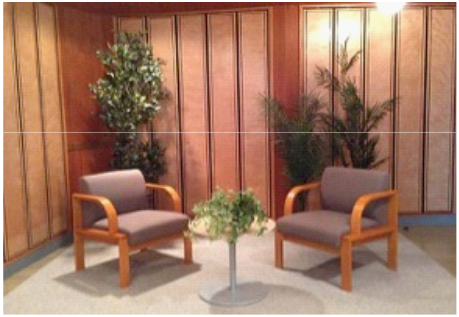
Figure 8. Monitors from Lecturer’s View
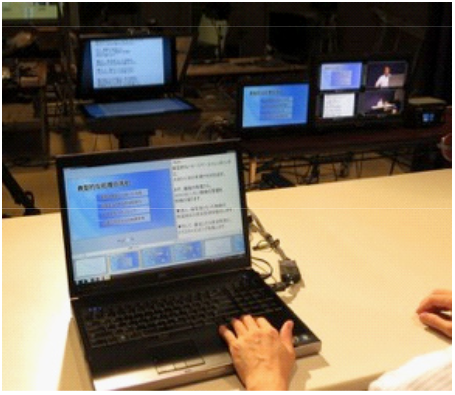
Figure 9. Prompter
For Staff
I believe one of the most important aspects of such a project is that the staff is motivated to refine their skills and continue to improve the team. To this end, the staff can participate in workshops at television stations. In this chapter, a useful tool for staff and visual instructional materials are introduced.
Script Sheet Generating Tool
When shooting video, preparing a script sheet is common so that the entire staff will have a full
awareness of the project. The script sheet includes not only the lecturer’s script but also detailed
information such as screen images, camera work, telop, etc. To create the script sheet, so far, a
director had to prepare it manually, with considerable effort. To facilitate the process, I developed
a script sheet generating tool, as most lecturers and directors are familiar with the operation of
PowerPoint. Like the prompter tool, I developed this tool using PowerPoint macro. Users embed
tags into the note area of PowerPoint, and the required information will be input to the adequate
column of the sheet according to the type of tag. Figure 10 is a screenshot of PowerPoint; scripts
and tags are shown in the note area at the lower right. Figure 11 is a sample of a script sheet that
has been output in MS Word format. For multiple lecturers, the scripts can be automatically color-
coded. The other important feature is that the tool has a time prediction function. In my case, I
speak about 250 characters per minute in Japanese. If the lecturer sets the number of characters
per minute, the predicted time required will be put into each section automatically. This function is
extremely useful. For example, if a shooting has gone over time, staff can immediately determine
how much should be cut. Or, to insert some video or intermission, staff can input the tag below:
<Intermission type=”video”>60</intermission>
The tool will add 60 seconds in total. Other tags are summarized in Table 1. This tool is also used
in shooting most online courses.
Video Manual on the Web
For technical staff, we prepared a video manual of our studio and equipment (Table 2). In this video manual, the target equipment is the same as usual. It is also used for new employees.
Television lecture series “Creative Technologies for Digital Content”
For technical staff and general learners, we developed a television lecture series (15 45-minute lectures). The title is “Creative Technologies for Digital Content” (Table 3). This lecture series is for beginners to advanced. As it includes professional suggestions, we feel that technical staff motivation will increase.
Figure 10. PowerPoint
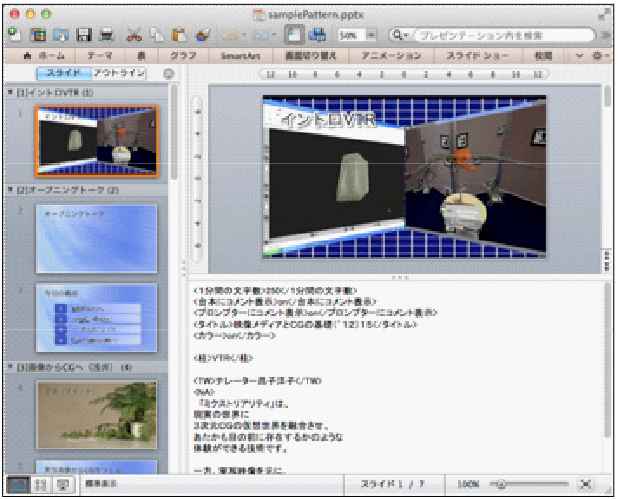
Figure 11. Generated Script Sheet
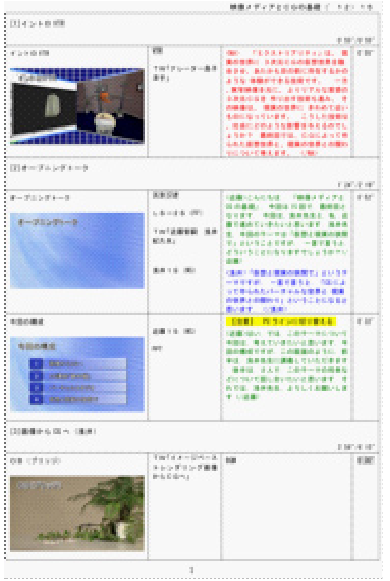
Table 1. Tag Specification of Script Sheet Generating Tool
| Initial settings | <numberOfCharacterPerMin> | Number of characters in one minute: 250 (default) |
| <comment4script> | Comment in script sheet: on / off | |
| <comment4prompter> | Comment on prompter: on / off | |
| <title> | Title at header of script sheet: (character string) | |
| <color> | Color print: on / off | |
| Camera Work Content information |
<scene> | Scene information: (character string) |
| <tw> | Telop: (character string) | |
| <c> | Camera work: (character string) | |
| <!- comment --> | Comment: (character string) | |
| Intermission | <intermission> | e.g.: <Intermission type="BGM"> 30 </ intermission> |
| <fixedTime> | Fixed time: sec / min'sec" e.g.: 90 / 1'30" | |
| Speaker | <speaker> | e.g.: <NA>, <Kondo> |
Table 2. Video Manual Contents
| 1 | Camera operation | 4 | Sound equipment (Fig. 13) | 7 | Appendix <prompter, crane> |
| 2 | Tripod operation | 5 | Shooting <studio> | 8 | Example of use | 3 | Lighting (Fig. 12) | 6 | Shooting <location> | 9 | Tools |
Fig. 12 Studio Light Control
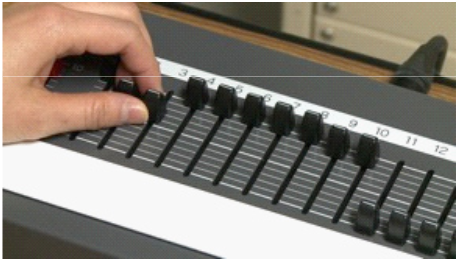
Fig. 13 Audio Settings of the Video Camera
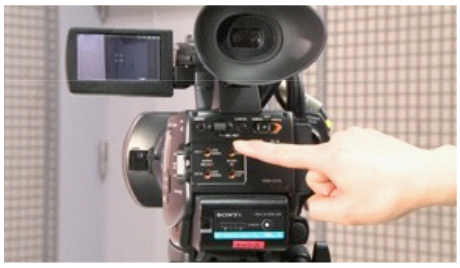
Table 3. Contents of “Creative Technologies for Digital Content”
| 1 | Principle of the video | 6 | Composition and imaginary line (Fig.14) | 11 | Scenario |
| 2 | Montage | 7 | Lighting | 12 | Shooting practice |
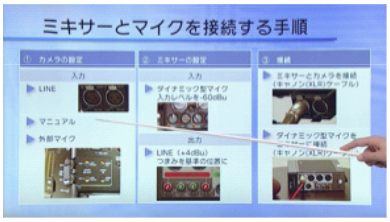
| 3 | Basic functions of video camera | 8 | Microphone | 13 | Editing practice | 4 | Adjustment of brightness | 9 | Sound (Fig.15) | 14 | Computer Graphics |
| 5 | Camera work | 10 | Preproduction / Post- production | 15 | 3D video |
Figure 14. Imaginary Line
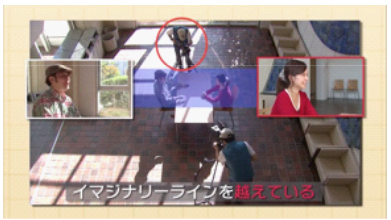
Figure 15. Audio Mixer
Results and Conclusions
In April 2016, eight full online courses were launched (Table 4). A cumulative total of over 4,000 people enrolled in the first semester. There have been no major difficulties so far, although there were a few modifications. Therefore, I believe this project was successful.
After finishing video production, the video lectures are embedded in the LMS (Figure 16). The videos were encoded as follows: the resolution is 640 x 360 pixels, and the overall bit-rate is 1Mbps and under.
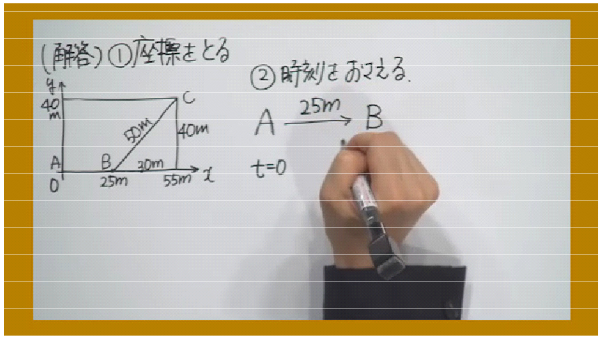
In this project, we produced many types of video lectures. Fig. 3 depicts an on-location interview of ‘Sensibility Engineering’, Fig. 6 shows a straight talk lecture of ‘Media and Intellectual Property’, Fig. 16 is of a talk lecture of ‘Problems and Exercises in Physics’, and Fig. 17 is of a hand- drawn explanation of ‘Problems and Exercises in Physics.’ Although some parts of this project were outsourced, many parts were able to be developed by us. We accomplished the original objective.
Recalling my experience as project manager, I feel the most important thing was the philosophy I mentioned before. The technical aspects such as video shooting could be done with sufficient training. However, without a trust relationship between lecturers and staff, technological ability alone cannot motivate staff to develop a good production. I believe working together is the way that both professionals and non-professionals can create high-quality content.
Table 4. Online Courses Opened in 2016
| Title | Number of chapters | Title | Number of chapters | |
|---|---|---|---|---|
| Undergraduate | Understanding Cancer in Japan | 15 | Sensibility Engineering | 8 |
| Introductory Course on Women's Career Design | 8 | Media and Intellectual Property | 15 | |
| Introduction to Java Programming | 8 | Problems and Exercises in Physics | 8 | |
| Master | Methods for Analyzing Species Composition Data | 15 | Theories and Practices of e-Learning | 15 |
Figure 16. Screenshot of LMS
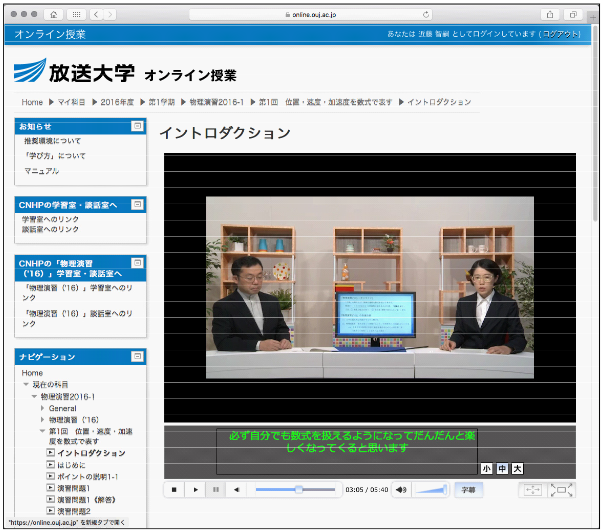
Figure 17. Explanation by Hand Drawing
References
Adobe Systems Incorporated. (2016). Audition. Retrieved from http://www.adobe.com/products/ audition.html
Kawahara,T. (2012). Transcription system using automatic speech recognition for the Japanese Parliament (Diet). In Proc. AAAI/IAAI, pp.2224-2228
NUGEN Audio Ltd. (2016), Loudness Management Batch processing, Retrieved from http:// www.nugenaudio.com/lmb-loudness-management-automatic-batch-processing-file- application_21
Footnotes
* ^ The original version of this paper was presented at the 30th Annual Conference of the Asian
Association of Open Universities held at Crowne Plaza Manila Galleria, Manila, Philippines on 27
October 2016.
International Journal on Open and Distance e-Learning, Vol. 3 No. 1, June 2017 Issue